Home / Guides / Record your microphone and system audio together
Record your microphone and system audio together
Talk over a video, play guitar along with a YouTube track, record a tutorial with your voice on it. AudioRoute puts your microphone and the computer's sound in one take, lined up in time.
How to
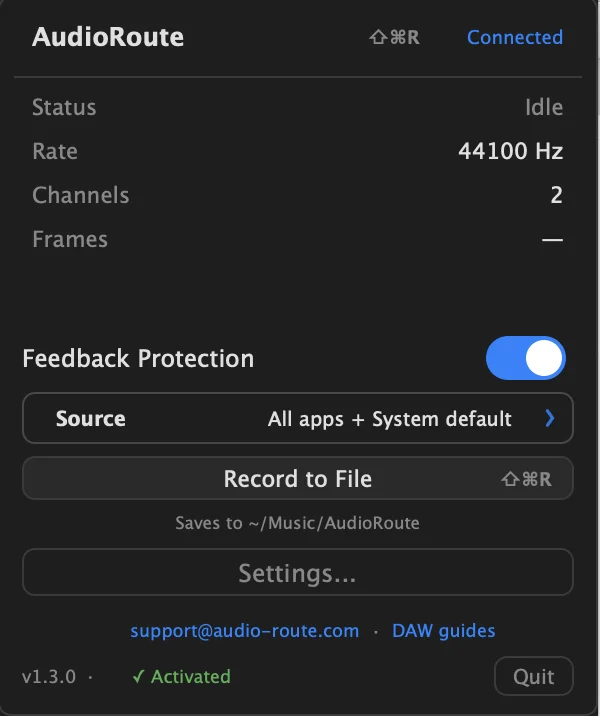
1. Open What to record
Click Source in the AudioRoute menu bar panel, or in the plug-in if you work in a DAW.
2. Turn on Input
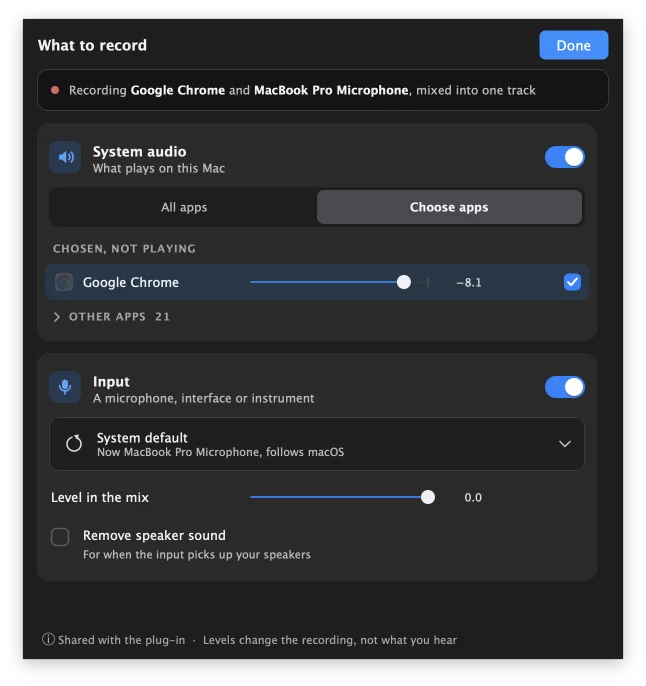
Turn on Input and pick your microphone, interface or instrument. The first time, macOS asks to let AudioRoute use the microphone.
3. Record
Record the way you already do. Your voice and the computer's sound land in one take. Use Level in the mix to balance them, even while recording.
Turn system audio off if you want the input on its own.
Where it works
Everywhere AudioRoute records: the menu bar recorder, the plug-in's Record tab and Live to track, and any app that records from AudioRoute Input, like OBS or the Mac's screen recorder.
FAQ
Can AudioRoute record my microphone and computer audio at the same time?
Yes. On a Mac with AudioRoute 1.3.0 or later, turn on Input in What to record. Your microphone and the computer's sound record into one take, lined up in time.
Do the microphone and system audio go on separate tracks?
No, they are mixed into one track. Level in the mix sets the balance. For separate tracks, record the microphone on its own track in your DAW and leave Input off in AudioRoute.
Can I use an audio interface or an instrument instead of a microphone?
Yes. Input takes any input device on the Mac: a microphone, an audio interface or a USB instrument.
Does it work in OBS, Zoom or QuickTime?
Yes. Pick AudioRoute Input as the microphone in that app and it gets your voice and the computer's sound together.
My speakers leak into the microphone. What do I do?
Use headphones, or turn on Remove speaker sound in What to record.
Can I use a Bluetooth headset?
Yes, but a Bluetooth headset drops to call quality while its microphone records. For full quality, use a wired microphone or the Mac's own.
Does it work on Windows?
Not yet. Inputs come to Windows in the next release. Recording system audio already works on Windows.
Try AudioRoute on your next session
Free 14-day trial, no credit card. €39 lifetime license, all future updates included.
Download AudioRoute View pricing