Home / Guides / Loopback alternative
The best Loopback alternative for capturing system audio
Loopback (by Rogue Amoeba) is a powerful, cable-free audio-routing app for macOS — it builds virtual devices that combine and route audio between apps and interfaces. But if what you actually need is to capture what your computer is playing — into a DAW or a file — Loopback can be more tool (and more money) than the job requires, and it's Mac-only. This is an honest side-by-side: where AudioRoute is the simpler, cross-platform fit, and where Loopback is genuinely still the better choice.
Choose Loopback if you need a flexible virtual mixer — combining and routing many app and hardware sources, with per-source monitoring and up to 64 channels. Choose AudioRoute if you just want to capture what your computer is playing into a DAW (via a VST3/AU/AAX plugin) or straight to a WAV, on both Mac and Windows. The single biggest difference: Loopback builds and routes virtual devices, while AudioRoute is a focused capture tool that also runs on Windows. AudioRoute is €39 one-time with a 14-day free trial.
The TL;DR
Use Loopback if you need a flexible virtual mixer — combining several apps and hardware inputs into one multi-channel device, with per-source monitoring and routing. That's its strength, and nothing here does it better. It's macOS-only and a paid one-time purchase.
Use AudioRoute if your goal is simply to capture what your computer is playing — into a DAW via a VST3 / AU / AAX plugin, or straight to a WAV via the built-in recorder — on Mac and Windows, for €39 lifetime (14-day free trial).
Side-by-side comparison
| Loopback | AudioRoute | |
|---|---|---|
| Price | Paid one-time license (free trial with limits) | €39 lifetime, 14-day free trial |
| Platforms | macOS only (14.5+) | macOS and Windows |
| Main job | Audio routing — build virtual devices, combine & route sources | Capture system audio into a DAW or a file |
| VST3 / AU / AAX plugin | No — creates a virtual device you record from | Yes — "AudioRoute Capture" (VST3 / AU / AAX) |
| Built-in recorder | No — you supply the recording app | Yes — one-shortcut WAV recorder in the menu-bar / tray |
| Multi-source mixing & many channels | Yes — up to 64 channels, per-source monitoring (its strength) | Focused on stereo system-audio capture |
| Record straight onto a DAW track | Via the virtual device as an input | Drop the plugin on a track — no device juggling |
| Updates / model | One-time; major upgrades typically paid | One-time; lifetime updates via Sparkle |
Why people look for a Loopback alternative
Loopback is excellent software. People go looking for an alternative because of fit, not quality — three reasons come up again and again:
1. It's macOS-only
Loopback is built on Core Audio, so it's Mac-only by design. The moment your work spans both platforms — you collaborate with someone on Windows, you teach on a PC, you move sessions between machines — Loopback can't come with you. AudioRoute ships the same plugin and the same recorder on macOS (Core Audio process taps) and Windows (WASAPI process loopback), with one license covering both.
2. It routes; it doesn't record into your DAW
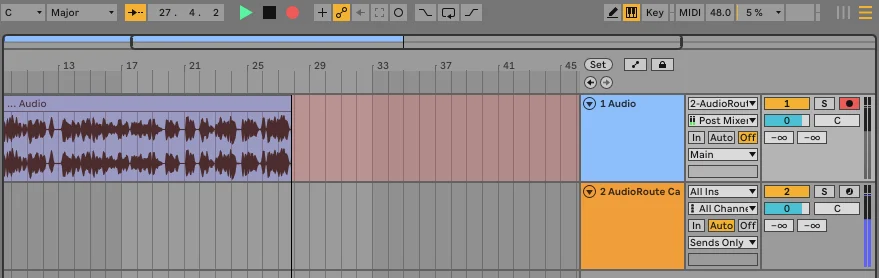
Loopback's job is to build a virtual device and route audio into it. To actually capture that into a DAW you then select the Loopback device as an input and arm a track — and to record to a file you bring your own app. AudioRoute skips the middle step: it ships an "AudioRoute Capture" plugin (VST3 / AU / AAX) you drop straight onto a track, plus a built-in one-shortcut WAV recorder. No virtual device to create, select, or manage.
3. It can be more tool than the job needs
If your goal is a complex virtual mixer, Loopback earns its price. But if you just want to record what your computer is playing, a 64-channel routing engine (and its price tag) is more than the task calls for. AudioRoute is built for that one job — capture system audio cleanly — for €39.
Where Loopback still wins
It would be dishonest to write this without saying plainly where Loopback is the better tool:
- Multi-source routing & mixing. Combining several apps and hardware inputs into one virtual device, per-source volume and monitoring, up to 64 channels, pass-through routing — this is Loopback's core strength and nothing does it better. Building a podcast mix-minus or a multi-app broadcast setup? Use Loopback.
- Deep macOS routing control. Fine-grained channel mapping and app-to-app routing that AudioRoute intentionally doesn't replicate — AudioRoute is a capture tool, not a routing matrix.
- The Rogue Amoeba ecosystem. It pairs tightly with Audio Hijack, with years of polish behind it.
In short: need to route and mix many sources → Loopback. Need to capture what's playing into a DAW or a file, on Mac or Windows → AudioRoute.
How AudioRoute is different under the hood
Both tools touch "system audio," but they're built for different ends. Loopback creates and routes virtual devices — you assemble sources into a device and send it wherever you like. AudioRoute observes what your Mac or PC is already playing and captures it, without rerouting your output.
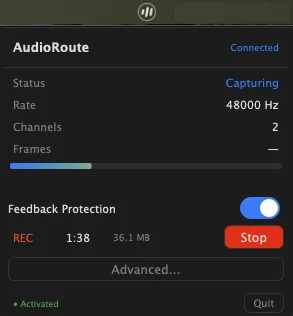
A small user-space daemon taps the system audio and writes the frames into a shared-memory buffer; the VST3 / AU / AAX plugin, the virtual input device, and the tray-app recorder all read from that same buffer. Your existing output keeps working unchanged — there's no device to build or select, and nothing to rewire when you swap headphones or interfaces.
If you want the deeper technical version — process taps, shared-memory layout, why this avoids building devices at all — the architecture page covers it.
How to switch from Loopback to AudioRoute
If you were using Loopback mainly to capture system audio, switching takes a few minutes.
- Download AudioRoute from the download page and run the signed installer.
- To record in a DAW, drop the AudioRoute Capture plugin on a track and arm it (see the Logic or Ableton walkthroughs). To record to a file, just hit the recorder shortcut in the tray / menu-bar app.
- Set your output device back to normal. The Loopback virtual device you were routing through isn't needed for capture — AudioRoute doesn't reroute your output.
- Keep Loopback if you still use its routing/mixing — the two don't conflict and can coexist. Only AudioRoute needs to be running to capture.
A note on pricing
AudioRoute is €39 as a one-time purchase — 14-day free trial, lifetime updates, no subscription — and covers both macOS and Windows on one key. Loopback is a paid one-time macOS license at a higher price point (with a limited free trial).
If you need Loopback's routing and mixing power, it's worth its price — this page isn't trying to talk you out of it. But if you landed here because you just want to capture system audio into a DAW or a file, AudioRoute does that specific job for less, on both platforms, with a plugin and a recorder built in. The trial lets you confirm it fits before paying anything.
Related guides
- AudioRoute vs BlackHole — the free virtual-device alternative, compared honestly.
- VoiceMeeter alternative — the same question on the Windows side.
- Record system audio on Mac (no DAW required) — the simplest AudioRoute workflow.
- Record system audio in Ableton Live — live routing into a DAW track.
- On-Demand mode — for power users who want zero background services.
Try AudioRoute on your next session
Free 14-day trial, no credit card. €39 lifetime license, all future updates included, macOS and Windows.
Download AudioRoute View pricing