Home / Guides / AudioRoute vs BlackHole
AudioRoute vs BlackHole
BlackHole has been the go-to free virtual audio device on macOS for years, and for good reason — it's open source, dependable, and Apple-Silicon-native. So why does AudioRoute exist? Because the setup ritual around BlackHole is the part that hasn't aged well. This is an honest side-by-side: where AudioRoute is better, where BlackHole still wins, and how to migrate if you decide to switch.
BlackHole is the free, open-source pick if you're Mac-only, don't mind building an aggregate device in Audio MIDI Setup once, and only need a virtual device. Choose AudioRoute if you want capture working the moment you install (no aggregate device), a VST3/AU plugin you drop on a DAW track, or the same workflow on Windows. The single biggest difference: AudioRoute never touches your output routing, so there's nothing to build or rebuild when you change devices. AudioRoute is €39 one-time with a 14-day free trial.
The TL;DR
Use BlackHole if you're already comfortable with macOS audio routing, you don't mind setting up an aggregate device once, you only need the virtual-device path (no DAW plugin), and you're on Mac only. It's free, open source, well-maintained.
Use AudioRoute if you want a working capture path the moment you finish installing — no aggregate device, no Audio MIDI Setup — or you need a VST3 / AU plugin you can drop on a track, or you need the same workflow on Windows. €39 lifetime, 14-day free trial.
Side-by-side comparison
| BlackHole | AudioRoute | |
|---|---|---|
| Price | Free, open source | €39 lifetime, 14-day free trial |
| Platforms | macOS only | macOS and Windows |
| Aggregate device required to hear what you're capturing? | Yes — build one in Audio MIDI Setup | No — your normal output keeps working |
| VST3 / AU plugin | No — virtual device only | Yes — "AudioRoute Capture" on macOS and Windows |
| Standalone WAV recorder | No — you supply the recording app | Yes — built into the menu-bar / tray app |
| Breaks when you change your output device? | Often — aggregate device has to be rebuilt | No — not coupled to your output device |
| Updates | Community releases, irregular | Auto-updates via Sparkle, lifetime included |
| Sample rates | Up to 768 kHz (configurable channel count) | Up to 192 kHz, 32-bit float |
| License model | GPL-3.0 | Proprietary, one-time purchase, lifetime updates |
Why people look for a BlackHole alternative
BlackHole as a piece of software is solid. What's painful is the workflow around it. Three things that come up over and over in forum posts and Reddit threads:
1. The aggregate device setup
BlackHole only routes audio — it doesn't let you hear what you're routing. To do both at once you build an aggregate device (or a multi-output device) in macOS's Audio MIDI Setup app that combines BlackHole and your real speakers (or audio interface). Then you switch your Mac's output to that aggregate. The first time you do this, you also fight clock drift, sample-rate mismatches, and "which device is the master." If you only do it once, fine. If you swap headphones, plug in an interface, or change setups regularly, you'll re-do it more than you'd like.
AudioRoute side-steps this by not touching your output at all. Your output device stays whatever you had it set to — built-in speakers, headphones, an audio interface, AirPlay — and AudioRoute gets a parallel copy of whatever your Mac is playing. There's no aggregate device because there's nothing to aggregate; the original output path keeps working unchanged.
2. No DAW plugin
BlackHole is a virtual audio device. To get audio into Ableton, Logic, Reaper, or any DAW, you have to select BlackHole (or your aggregate device) as the recording input and arm an audio track. That works, but it ties the recording flow to a system-wide device assignment.
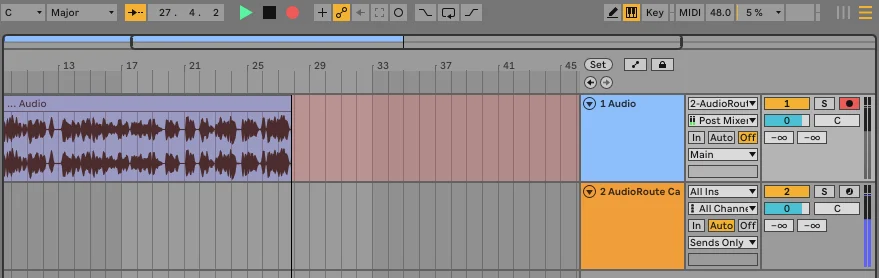
AudioRoute ships an actual VST3 / Audio Unit plugin called "AudioRoute Capture" that you drop onto a track inside your DAW. The plugin reads from the AudioRoute daemon's audio buffer and presents the system audio as if it were any other input. Same effect from the DAW's point of view, no input-device juggling.
3. macOS only
BlackHole is a CoreAudio HAL plugin, which means it's macOS-only by design. If your workflow ever spans both platforms — you're collaborating on Windows, you teach on a PC, you bounce sessions between machines — you need a separate tool on the other side (and Windows's equivalents tend to be far less polished).
AudioRoute ships on both macOS (CoreAudio process taps) and Windows (WASAPI process loopback) with the same VST3 plugin and the same tray-app recorder on both. Your license covers both platforms with the same key. The AudioRoute Input virtual device ships on both as of version 1.0 review, but the plugin and tray recorder already work on Windows today.
Where BlackHole still wins
It would be dishonest to write this comparison without acknowledging where BlackHole is genuinely the better fit:
- It's free. No license to buy, no trial expiry, no email capture. If budget is the only thing standing between you and a working capture path, BlackHole gets you there for zero dollars.
- It's open source. GPL-3.0, fully inspectable, community-maintained on GitHub. If "I can read the source" matters to you, AudioRoute is closed source today and that's a trade-off.
- It supports very high sample rates and channel counts. BlackHole's 16-channel build at up to 768 kHz is overkill for most use cases but genuinely useful in pro-audio research and multichannel work. AudioRoute targets stereo × 192 kHz / 32-bit float, which covers the realistic ceiling for music production but not the experimental tail.
- It's been battle-tested for years. AudioRoute is newer. BlackHole has thousands of installs and has had time to shake out edge cases across many DAW + macOS combinations.
In short: if your workflow is stable, single-platform, and you've already paid the one-time cost of building an aggregate device, the case for switching is weaker. The case is strongest when any of those three things isn't true.
How AudioRoute is different under the hood
Both tools solve the same surface-level problem — "let me capture what my computer is playing" — but they take different paths.
BlackHole creates a virtual device. Your Mac's audio engine routes output through it (when you select it). To monitor what's flowing, you build the aggregate-device combination. Anything sent to that device is also recordable from it by any app that can record from an input.
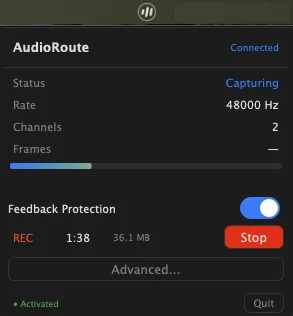
AudioRoute observes the system audio output without redirecting it. A small user-space daemon taps into whatever your Mac is already playing and writes the captured frames into a shared-memory buffer. The VST plugin, the virtual input device, and the tray-app recorder all read from that same buffer. Your existing output device keeps working because nothing is rerouted.
If you want the deeper technical version — CoreAudio process taps, shared-memory layout, why this avoids the aggregate-device problem entirely — the architecture page covers it.
How to migrate from BlackHole to AudioRoute
If you've been running BlackHole and want to switch, this takes about five minutes.
- Download AudioRoute from the download page and run the signed installer. It'll ask for your admin password once.
- Don't uninstall BlackHole yet. AudioRoute doesn't conflict with it — they can coexist while you try AudioRoute on a couple of sessions and verify it covers your workflow.
- In your DAW, drop the AudioRoute Capture plugin on a track and arm it. (On Logic Pro, this is a Software Instrument track — we have a dedicated Logic walkthrough if that's your DAW.) Or open Audacity / OBS / Zoom / any recording app and pick AudioRoute Input as the recording source.
- Switch your Mac's output device back to its original setting — the aggregate device that BlackHole needed is no longer relevant. Your speakers, headphones, or audio interface are now the direct output again.
- Optional cleanup: once you've confirmed AudioRoute covers what you needed, you can uninstall BlackHole (follow ExistentialAudio's uninstaller) and delete the aggregate device from Audio MIDI Setup. Or leave them in place if you'd rather hedge.
A note on pricing
AudioRoute costs €39 as a one-time purchase, with a 14-day free trial and a 14-day money-back guarantee. There's no subscription, and updates are included for life. BlackHole costs nothing.
That price-to-free comparison sounds bad on paper, but for the audience that's googling "BlackHole alternative" specifically, the math usually pencils out the other way: an hour of debugging aggregate devices, lost monitor signal during a recording, or the friction of explaining the setup to a collaborator is worth more than €39 once. The trial is there precisely so you can decide that for yourself before paying anything.
Related guides
- Record system audio on Mac (no DAW required) — the simplest AudioRoute workflow.
- Record system audio on Windows (no DAW required) — the same workflow on Windows.
- Record system audio in Logic Pro — live routing into a DAW track.
- Record system audio in Ableton Live — live routing, Mac & Windows.
- On-Demand mode — for power users who want zero background services.
Try AudioRoute on your next session
Free 14-day trial, no credit card. €39 lifetime license, all future updates included, macOS and Windows.
Download AudioRoute View pricing