Home / Guides / Bit-perfect capture
Bit-perfect system audio capture on Mac
Bit-perfect means there's no sample-rate conversion, no bit-depth conversion, and no extra DSP added between the system audio mix and the file you save. For most workflows this doesn't matter; for mastering reference, archival work, lossless library curation, or any time you care that nothing has touched the audio between source and disk, it matters a lot. This guide shows the three settings that get you there with AudioRoute on macOS — and an honest note up front about what Apple's process-tap API itself does to the signal that no third-party tool can change.
On macOS, AudioRoute adds zero resampling and zero bit-depth conversion — but the result is bit-transparent, not perfectly sample-identical. Apple's Core Audio process-tap API applies an ingestion-side reconstruction filter that no capture tool can bypass, so music and speech come through effectively untouched while broadband test signals (square waves, impulses) show measurable ringing. For a genuinely sample-identical chain end-to-end, use the Windows path, which relies on a different OS API. To get as close as possible on Mac: match your output device's sample rate in Audio MIDI Setup, set AudioRoute's Rec Rate to Auto, and record at 32-bit float.
Update (June 2026): Apple's macOS Core Audio process-tap API performs some ingestion-side reconstruction filtering that no app using CATapDescription can opt out of. AudioRoute on Mac is bit-transparent for typical content (music, speech, anything not extending right up to Nyquist) but is not sample-identical to broadband test signals like square waves or impulses. AudioRoute's own pipeline still adds zero resampling and zero conversion — we just capture what Apple's tap delivers. See An honest note about Apple's process-tap API below for the details, methodology, and what we're doing about it. The Windows path is genuinely bit-identical end-to-end, because it uses a different OS API that doesn't have this layer.
- What "bit-perfect" actually means
- An honest note about Apple's process-tap API
- Quick setup (three steps)
- Step 1 — Set the output device rate in Audio MIDI Setup
- Step 2 — Set AudioRoute to Auto
- Step 3 — Record
- Why the manual rate-matching step is unavoidable
- Verifying the capture
- When the resampler does fire
- Which sources support this
- FAQ
What "bit-perfect" actually means
Every byte of audio that leaves a streaming app or a media player has a sample rate (e.g. 44.1 kHz, 48 kHz, 96 kHz, 192 kHz) and a bit depth (16-bit, 24-bit, or 32-bit float). A capture is bit-perfect if the recorded WAV has the same rate and depth as the source and the audio data has not been processed in between.
In practice this means three things didn't happen:
- No sample-rate conversion (SRC). If the source is 96 kHz and the recorder writes 96 kHz, no resampler ran. If the recorder wrote 48 kHz from a 96 kHz source, something resampled and the file is no longer identical to the source.
- No bit-depth conversion. 24-bit source → 24-bit file; 32-bit float source → 32-bit float file. Truncation or dithering between the two destroys bit-equivalence.
- No mixing, gain change, EQ, or any other DSP between the source and the file. The captured byte stream is identical to the byte stream the source was producing.
For most recording use cases none of this matters — a 44.1 kHz WAV of a YouTube reference track for mix inspiration is fine. But if you're doing mastering reference work, building a personal lossless library, archiving live streams, or verifying a streaming service against its claimed source quality, bit-perfect capture is the only correct mode.
One thing bit-perfect doesn't mean. It doesn't mean the source was lossless. If you bit-perfect-capture a YouTube video, the WAV is a bit-perfect copy of the lossy audio YouTube delivered. "Bit-perfect" describes the capture chain, not the source material. To get a lossless WAV, the source has to be lossless too — Apple Music Hi-Res Lossless, Tidal HiFi, Qobuz, local FLAC, etc.
An honest note about Apple's process-tap API
Before the three-step setup, the macOS-specific caveat worth knowing up front. AudioRoute on Mac uses Apple's Core Audio process-tap API (CATapDescription + AudioHardwareCreateProcessTap) to capture system audio — the same API every modern macOS capture tool that doesn't ship a kernel driver is using (Audio Hijack's tap mode, Insert, anyone using Apple's documented API path). On June 2026, Joel (developer of Insert) DM'd us to share his finding that this API itself isn't truly bit-perfect — something happens at the first memcpy on ingestion that introduces a reconstruction filter. We ran the same null test on our end to verify.
What we measured
Source: 200 Hz square wave, ±0.5 amplitude, generated at the device's native 96 kHz (no resampler engaged on render). Played via afplay. Captured by AudioRoute at the same 96 kHz, no resampler engaged in our pipeline. Then nulled against the source after sample-level alignment.
| Quantity | Source | Capture |
|---|---|---|
| Peak amplitude | 0.5000 (−6.0 dBFS) | 0.6290 (−4.0 dBFS) |
| RMS | 0.5000 (−6.0 dBFS) | 0.4735 (−6.5 dBFS) |
| Residual peak after null | — | +1.3 dBFS |
| Residual RMS after null | — | −2.9 dBFS |
The capture peak overshoots to ±0.629 — 26% above the source's flat top. Zooming in on any transition shows the signature of a non-ideal bandlimited reconstruction filter: classic Gibbs pre-ringing in the samples leading up to the edge, then post-ringing for several samples after.
sample  source     capture
 237   +0.50000   +0.460   ← starting to dip
 238   +0.50000   +0.628   ← pre-ringing overshoot (+26%)
 239   +0.50000   +0.321   ← undershoot
 240   -0.50000   -0.586   ← post-ringing overshoot
 241   -0.50000   -0.526
 243   -0.50000   -0.552   ← still ringing
 245   -0.50000   -0.553
What this means in practice
This is the OS layer doing something we and every other Mac capture tool can't change. To be precise about what each part of the chain on Mac actually does:
- Apple's process-tap layer: applies a reconstruction filter at ingestion. Affects every
CATapDescription-using tool the same way. - AudioRoute's pipeline: zero resampling, zero bit-depth conversion, zero gain. What comes out of Apple's tap is what lands in the WAV.
For music and speech this is inaudible. Those signals don't carry content extending right up to the Nyquist frequency where the filter operates — the residual lives in the spectral region that's already empty in the source. For square waves, impulses, and broadband test signals the residual is measurable and visible. If you're bit-perfect-capturing Hi-Res Lossless music for archival or curation, the practical fidelity is high. If you're trying to prove a chain is sample-identical with a square-wave null test, it won't pass on Mac through Apple's process tap.
What we're doing about it
Apple's the only one who can change the ingestion-stage behaviour — no user-space app can patch it. We're filing an Apple Feedback Assistant report alongside Joel's (Insert dev) so Apple sees this from two independent codebases. In the meantime we've updated the marketing copy and this guide to describe the actual chain accurately rather than claim something the OS API doesn't deliver.
The Windows side is genuinely bit-identical end-to-end via WASAPI process loopback — verified with the same null-test methodology, max |c − s| = 0 across multiple device rates and source types. Different OS, different API, different result.
The three-step setup below still does what it says. Auto-rate matching, no AudioRoute-added resampling, zero conversion in our pipeline — all true. The honest framing is that AudioRoute on Mac is native-rate, no-added-resampling capture, with the OS-side caveat above. Read the rest of the guide on that basis.
Quick setup (three steps)
Get bit-perfect capture working in 90 seconds:
- In Audio MIDI Setup, set your default output device's Format to match the source's native sample rate and bit depth.
- In the AudioRoute tray app's Advanced settings, set Rec Rate to Auto.
- Start the source playing, hit Record. The WAV will be sample-for-sample identical to what's being played.
The next three sections walk through each step with screenshots so you can confirm you've set things correctly.
Step 1 — Set the output device rate in Audio MIDI Setup
macOS does not automatically switch your audio output device's sample rate to match what a streaming app is playing — it just resamples the audio down to the device's currently-configured rate. If you want the device (and therefore AudioRoute's tap) to operate at the source's native rate, you have to set it manually before playback starts.
Open Audio MIDI Setup — it's in /Applications/Utilities/ (or hit ⌘ Space and type "Audio MIDI Setup"). In the left sidebar pick your default output device (e.g. your MacBook Pro Speakers, audio interface, or Bluetooth headset). On the right, find the Format dropdown and pick the rate + depth that matches the source you're going to capture.
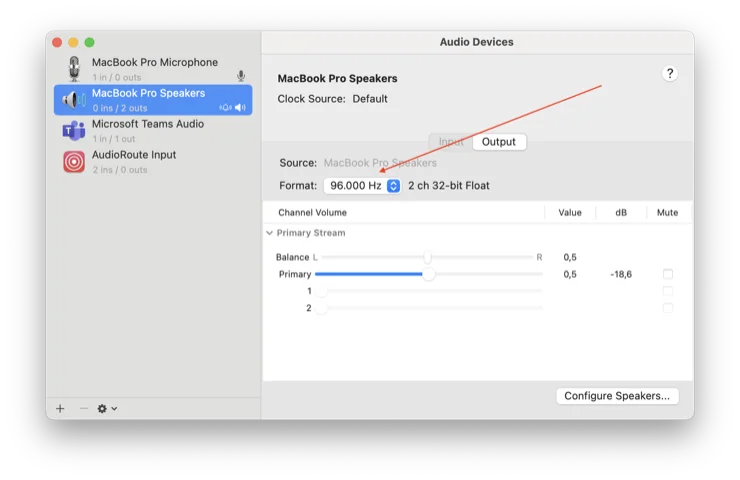
Common source rates worth knowing:
- 44.1 kHz / 16-bit — CD-quality. Local FLAC ripped from CD, Tidal HiFi base tier, Apple Music "Lossless" non-Hi-Res tracks, classic Spotify quality.
- 48 kHz / 24-bit — the default for most video/post-production sources, YouTube, Vimeo.
- 96 kHz / 24-bit — Apple Music Hi-Res Lossless (most tracks), Qobuz Hi-Res, Tidal Max, most 2L test material.
- 192 kHz / 24-bit — the highest tier on Apple Music Hi-Res Lossless, Qobuz Studio Masters, archival FLAC.
Step 2 — Set AudioRoute to Auto
Open the AudioRoute tray popup and click Advanced to expand the settings panel. Find the Rec Rate dropdown and pick Auto. Set Bit Depth to 32-bit float so the recording doesn't lose precision even if the source is 24-bit.
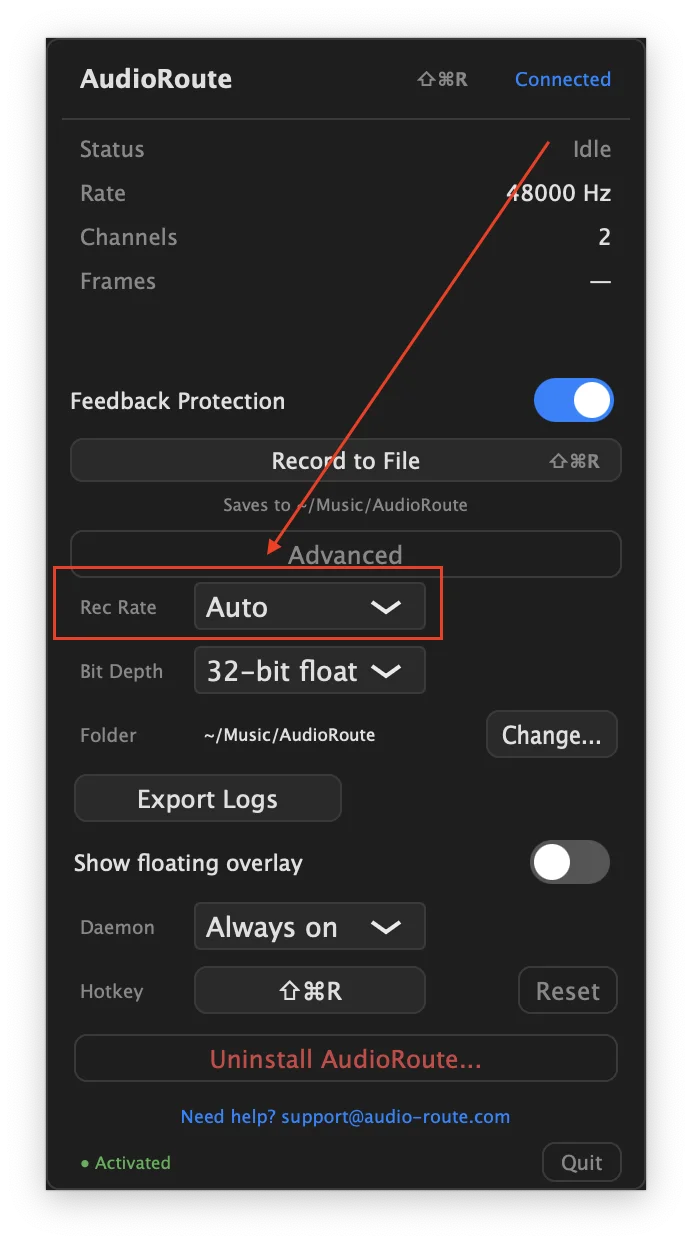
Auto is the magic setting here. Under the hood, AudioRoute's daemon reads the default output device's nominal sample rate via Core Audio, configures the tap at that rate, and writes the WAV at that rate. The internal ring buffer is a straight memcpy, no resampler in the path. Sample-for-sample identical from the OS audio mix to the file.
If you pick an explicit rate instead of Auto, the recording is written at the rate you picked. If that's different from the device's rate, AudioRoute resamples internally to honor your choice. That's the right behaviour when you specifically want a particular rate (e.g. a 44.1 kHz WAV to import into a 44.1 kHz session), but it means the file is no longer bit-identical to the source. For bit-perfect, leave it on Auto.
Step 3 — Record
Start the source playing first (Apple Music, your local FLAC player, Tidal, whatever), then hit Record to File in the AudioRoute tray. The status row will show the rate it's actually recording at — if your output device is at 96 kHz, you'll see 96000 Hz.
Stop the recording when you're done. The file lands in ~/Music/AudioRoute/ by default, named with the timestamp.
Why the manual rate-matching step is unavoidable
This is the part nobody likes but it's true of every system-audio capture tool on macOS, not just AudioRoute. macOS doesn't auto-switch the output device's sample rate to match the source — that's an Apple decision baked into Core Audio. The streaming app delivers audio at the source rate, macOS resamples it to whatever the device is configured to, the device outputs that, and our tap captures what the device gets.
If you want bit-perfect capture, both the device and the source have to be at the same rate. The only place the rate is configurable is Audio MIDI Setup (or Spotify/Tidal's hidden "exclusive mode" on some setups, which has its own trade-offs).
Tools like Audirvana and BitPerfect for HQPlayer work around this by taking exclusive control of the audio device and switching its rate per-track. AudioRoute deliberately doesn't — it would mean owning your device output instead of tapping it, which breaks every other workflow AudioRoute supports. The trade-off we made was: one manual step in Audio MIDI Setup, but the rest of your system audio keeps working normally.
Verifying the capture
The first thing to verify is the obvious one: the file's container format matches what you expected. Run afinfo on the resulting WAV from Terminal:
$ afinfo ~/Music/AudioRoute/recording_2026-06-09_*.wav | head -5
File:           /Users/you/Music/AudioRoute/recording_2026-06-09_16-43-36.wav
File type ID:   WAVE
Num Tracks:     1
----
Data format:    2 ch,  96000 Hz, 'lpcm' (0x00000009) 32-bit little-endian float
Check three things in that output:
- Sample rate matches Audio MIDI Setup (96000 Hz in this example).
- Bit depth matches what you selected (
32-bit little-endian floathere). - Channels matches the source (2 for stereo, 6 for 5.1, etc.).
That confirms format-level integrity — rate, depth, and channel count survived. For a stronger proof you can compare the captured WAV against the source file using a null test: subtract the two waveforms in any DAW or with sox / ffmpeg after sample-aligning them. On Mac the result will be near-silent for typical music and speech but won't be bit-identical, because of the OS-side reconstruction filter described in An honest note about Apple's process-tap API. The residual is in the high-frequency content concentrated at transients, not in the steady-state signal. For an end-to-end sample-identical capture chain, use the Windows path, which doesn't have this layer.
When the resampler does fire
AudioRoute does have an internal resampler — it just doesn't run in the Auto path when the device and recording rates agree. The resampler kicks in only when:
- You pick an explicit rate in the dropdown that differs from the device's rate. Setting Rec Rate to 44.1 kHz with the device at 96 kHz means AudioRoute downsamples 96 → 44.1 via Apple's
AudioConverter. The file you get is 44.1 kHz; the chain is no longer bit-identical to the source. - The Auto path can't resolve a rate (no default output device available, Core Audio query failed). It falls back to 48 kHz and resamples if needed. This shouldn't happen in normal use — the log will note when it does.
In short: leave Rec Rate on Auto and your captures are bit-perfect by default. Switch to a specific rate when you specifically need that rate, and accept the conversion that implies.
Which sources support bit-perfect capture
All of these can be captured bit-perfect on macOS as long as you set Audio MIDI Setup to match their native rate:
- Local FLAC / WAV / ALAC files in Music.app, VLC, or any player — the cleanest case. If you need material at a specific rate, export a few seconds at each rate from your DAW or Audacity rather than hunting for downloads: you then hold the original, so you can null-test the capture against it, which is a stricter check than listening to a file someone else made.
- Apple Music Lossless / Hi-Res Lossless — subscription required. Manually set Audio MIDI Setup to the track's native rate (Apple Music doesn't auto-switch).
- Tidal HiFi / HiFi Plus — FLAC at 44.1 kHz, up to 192 kHz on HiFi Plus tracks.
- Qobuz — FLAC, up to 192 kHz / 24-bit. (Not available in all regions.)
- YouTube, Spotify (non-HiFi) — the source itself is lossy (Opus/AAC), so "bit-perfect" applies to the capture but the audio is not lossless. Still useful if you want exactly what the system delivered.
Streaming services that deliver via AirPlay or proprietary network protocols (Tidal Connect, Roon) need a bit more setup — you have to route them through your Mac's default output for AudioRoute to see the stream. Local playback or browser-based playback is the simplest path.
FAQ
Why does my WAV say 48 kHz when I set Audio MIDI Setup to 96 kHz?
Three possibilities, in order of likelihood:
- You're on AudioRoute 0.1.13 or earlier. The Auto-rate resolution that follows the device rate landed in 0.1.14. Update from the tray menu (or download fresh from audio-route.com) and retry.
- The source itself is 48 kHz (most YouTube videos, Zoom calls, video files) — the device upsamples 48 → 96 for output, but the captured tap sees the 48 kHz original. Bit-perfect capture of a 48 kHz source produces a 48 kHz WAV; that's correct behaviour.
- The source app is forcing the device rate. Some apps (Pro Tools, certain DAWs) override the device's sample rate when they take focus. Quit them and re-check Audio MIDI Setup.
Does this work for 5.1 / surround content?
AudioRoute captures stereo today. Multi-channel surround capture is on the roadmap but isn't shipping yet. For now, surround sources are mixed down by macOS to stereo before AudioRoute sees them.
Why 32-bit float and not 24-bit integer?
32-bit float is the format Core Audio uses internally, so writing it directly avoids a depth conversion. If your source is 24-bit, the 32-bit float file holds an exact representation of the 24-bit samples; nothing is lost. If you specifically need 24-bit integer for an older DAW, set Bit Depth to 24-bit explicitly — AudioRoute will dither the conversion. For bit-perfect work, stay on 32-bit float.
What about Bluetooth headphones?
Bluetooth audio is inherently lossy (SBC, AAC, or aptX codecs — all lossy compression). The Mac decodes the audio before sending to the Bluetooth chip, so AudioRoute's tap sees the decoded PCM, but the source has already been through codec processing in the streaming app's playback path. You can capture this bit-perfect, but it's not lossless. For lossless playback, use wired headphones or speakers.
Will this affect playback latency?
No. AudioRoute's tap is a non-blocking observer of the system mix — it doesn't insert itself in the playback path. Your headphones / speakers play the audio with the same latency as without AudioRoute installed.
Does Windows work the same way?
The Windows path landed in 0.1.15 and is architecturally similar — Auto-rate resolves to the device's mix format via WASAPI, and AudioRoute initialises the process-loopback client at that exact rate so no internal converter engages. The big practical difference is that the Windows OS API doesn't have the ingestion-side reconstruction filter that Apple's process-tap API has on Mac — so the Windows capture is verifiably sample-identical end-to-end (max |c − s| = 0). Full setup + the null-test results are in the Bit-perfect system audio capture on Windows guide.
Related guides
- Bit-perfect system audio capture on Windows — the Windows sibling to this guide, including the null-test data showing the OS-level path is sample-identical there.
- Record system audio on Mac (no DAW required) — the simpler everyday workflow when bit-perfect isn't your concern.
- Record system audio in Logic Pro — capture directly into a DAW track at session rate.
- How AudioRoute works under the hood — the daemon, tap, ring buffer, and rate-resolution path explained.
- AudioRoute vs BlackHole — honest comparison, including how each handles sample-rate matching.
Questions about bit-perfect capture?
If something's not behaving the way this guide describes — the WAV's sample rate doesn't match the source, the resampler fires when it shouldn't, anything — we'd like to hear about it.
Email support Back to guides